Posts

Showing posts with the label Tutorial

AR Build in Unreal Engine 5 for IOS device and talking about Particle Spawn Groups

Image
Setting up an Augmented Reality (AR) project in Unreal Engine on a Mac and deploying it to an iPad is an exciting process that allows you to create immersive AR experiences.  You can refer to this video for setting up certificates and other required authorization to proceed with the project: Here's a step-by-step guide to help you get started: Install Unreal Engine: Download and install Unreal Engine on your Mac by visiting the Epic Games website ( https://www.unrealengine.com/ ). Follow the instructions provided to set up and launch Unreal Engine on your Mac. Create a New Project: Open Unreal Engine and create a new project by selecting the appropriate template. For an AR project, you can choose either the "Blank" or "First Person" template and enable AR support. Enable ARKit Plugin: Unreal Engine uses Apple's ARKit framework for AR development on iOS devices. Enable the ARKit plugin by going to the "Edit" menu, selecting "Plugins," and ...

Working on an AR build in Android development with Unreal Engine 5.1

Image
Working on an AR build in Android development  Working on an AR build in Android development with Unreal Engine 5.1 opens up exciting possibilities for creating immersive and interactive augmented reality experiences. Unreal Engine provides robust tools and features that facilitate the development of AR applications for Android devices. Here are some key aspects to consider when working on an AR build in Android development with Unreal Engine 5.1: ARCore Integration:  Unreal Engine 5.1 has built-in support for ARCore, Google's platform for building AR experiences on Android devices. You can easily integrate ARCore into your project by enabling the ARCore plugin and configuring project settings. This allows you to utilize ARCore's tracking capabilities, environmental understanding, and plane detection to create realistic AR interactions. Content Creation:  Unreal Engine provides a wide range of tools and workflows for creating 3D content that can be used in your AR project...

Multiplayer Networking

Image
MULTIPLAYER NETWORKING The Multiplayer Programming Quick Start for Unreal Engine 5.1 is an exciting resource for developers looking to dive into multiplayer game development using the latest version of Unreal Engine. With multiplayer gaming becoming increasingly popular, understanding the fundamentals of networking and implementing multiplayer functionality is essential for creating engaging and immersive experiences. Unreal Engine is a powerful and widely-used game engine that offers robust multiplayer capabilities. The Quick Start guide aims to provide developers with a solid foundation in multiplayer programming, enabling them to create seamless online experiences for their games. The guide begins by introducing the basic concepts of multiplayer networking, including server-client architecture, replication, and authority. It then dives into the implementation details, covering important topics such as player spawning, input replication, and synchronization of game state across mult...

Exploring the Unreal First Person Shooter Tutorial

Image
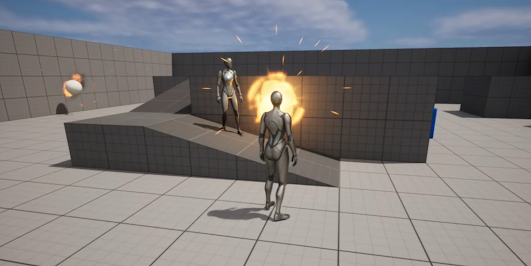
UNREAL FIRST PERSON SHOOTER TUTORIAL (Unreal 5.1.1) Introduction Welcome to the exciting world of game development! If you're looking to make your very own first-person shooter (FPS) game, then you're in the right place. In this blog, I'll be sharing my experience with the Unreal First Person Shooter Tutorial and my thoughts on creating my first FPS game. As a beginner in game development, I decided to try out the Unreal Engine because of its user-friendly interface and the vast range of tutorials available online. One of the most popular tutorials on the engine is the First Person Shooter Tutorial, which guides you through the process of creating a fully functional FPS game. The tutorial covers all the necessary basics, from setting up your project, creating levels, and importing assets to programming player movement, creating weapons, and adding enemies. The tutorial is presented in a step-by-step manner, making it easy for beginners to follow along. The first step was se...

C++ Programming in Unreal Engine 5.1

Image
C++ Programming Tutorial for Unreal Engine 5.1 Introduction: Unreal Engine is a powerful game development platform used by professionals and hobbyists alike. With the release of Unreal Engine 5.1, developers have access to enhanced features and improved performance. One of the key aspects of Unreal Engine 5.1 is its support for C++ programming, which provides developers with unlimited customization and control over their projects. In this tutorial, we will explore the basics of C++ programming in Unreal Engine 5.1, allowing you to unlock the full potential of this game development engine. The following are the links that are being referenced in the blog, so if you feel the blog is exaggerated you can refer to these links for the C++ programming tutorial: C++ programming for unreal engine   A Quick Start Guide  1. Setting up Unreal Engine 5.1: Begin by downloading and installing Unreal Engine 5.1 from the official Epic Games website. Launch the Unreal Engine Editor and create ...